Review Comments (0) Screenshots (6) Questions & Answers (0) Votes (0) Awards (12) Wiki  
GraphicRegion.com
3.5.10.18
www.graphicregion.com
Shareware
$32.00  Purchase
195 people
Download Able Batch...

4.78 MBDownloaded 1891 times

This software was checked for viruses and was found to contain no viruses.
Click here to see antivirus report.
 
Video tutorial for Able Batch Converter 3.5
Frame
Video tutorial for Able Batch Converter 3.1
Frame
This video tutorial has been acquired from Downloadtube.com

Review

This is official description

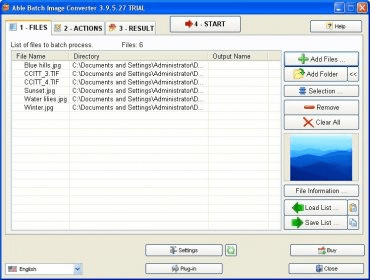
Batch Converter's simple, clear interface makes it a cinch to find files to convert, choose the new formats, and change file destinations. It will search for identical files, apply special treatment to certain files, and even delete the old files after they're converted. You can install plug-ins to expand the already large list of file types Batch Converter will handle. A handy preview window displays a thumbnail of a selected file on the Files tab.
 
The following review written by one of the Software Informer contributors applies to version 3.1

Able Batch Converter is a handy conversion tool that enables you to convert different image files from one format into another. But that is not all this program does. Using this application you will be able to edit your image files with a lot of effects such as mirror, various filters, rotate, flip, watermarks, color enhancements, margins, crop and more.

Able Batch Converter is a complete application that supports a big number of image files, including JPG, JPE, BMP, ICO, PPM, PSD, PDF, AI, TIF, GIF, MIFF, PNG and many more. This program couldn't be easier to use. All you have to do to convert your files from one into another is add the files you want to convert into the program's main window, set some output parameters and then click on the "Convert" button. If you want to convert directly without modifying any advanced settings, all you have to do is click on the "Convert" button. Able Batch Converter also allows you to compress your image files. This program supports converting a lot of files with different image formats at once. The program's interface is very accurate and the program works very fast.
  • It supports batch conversion.
  • It has a well designed interface.
  • It supports plenty of formats.
  • It allows you to edit your files.
  • There are some conversion tools that do the same for a lower price.

Reviewed by: Sebastian Fernandez

Reviewer rating:

Reviewed: 2 years ago

What's new in version 2.9

+ New action. Auto Crop Line.
+ New input format: DICOM (*.dcm;*.dic;*.dicom)
+ New input format: JBIG files.
+ Automatic B&W conversion (Threshold) with preview
+ New command line parameter: /deskewing, /autocrop, /autocrop2, /pages
+ New parameter. Preview for AutoCrop and AutoCrop2 action.
Report a wrong version Report a wrong program title Suggest a correction

Screenshots

Main window Main window Main window Main window Settings Settings Main window Main window
All 6 screenshots

Latest comments


There are no comments, be the first one!
Add new comment

E-mail Address:

Password:

Register now »

Forgot password?

Sign in with:
Download Software Informer Client
Copyright © 2012, Informer Technologies, Inc. About| Privacy and terms| Help| Feedback & Support| Partners program